Stop using valuable AI conversations just to figure out what you should have asked in the first place.
Build complete, structured prompts in your own browser. Refine them as often as you like. Then copy your finished instructions into ChatGPT, Claude, Gemini, Grok, or your preferred AI assistant.
No API key. No additional account. No AI calls required to build your prompts.
Your AI Usage Should Go Toward Getting Things Done. Not Getting Your Instructions Straight.
You open ChatGPT with an idea.
You explain what you want.
The AI gives you something close—but not quite right.
You forgot to specify the audience. The format isn't what you needed. There's a requirement you didn't include. Or the AI started generating before you supplied the material it needed.
Now you're spending another exchange correcting the instructions.
And possibly another.
What if you could handle most of that preparation before opening your AI assistant?
That's exactly what Prompt Builder Studio was built to do.
Meet Prompt Builder Studio
Your browser-based workspace for building structured AI prompts without spending AI usage on prompt construction.
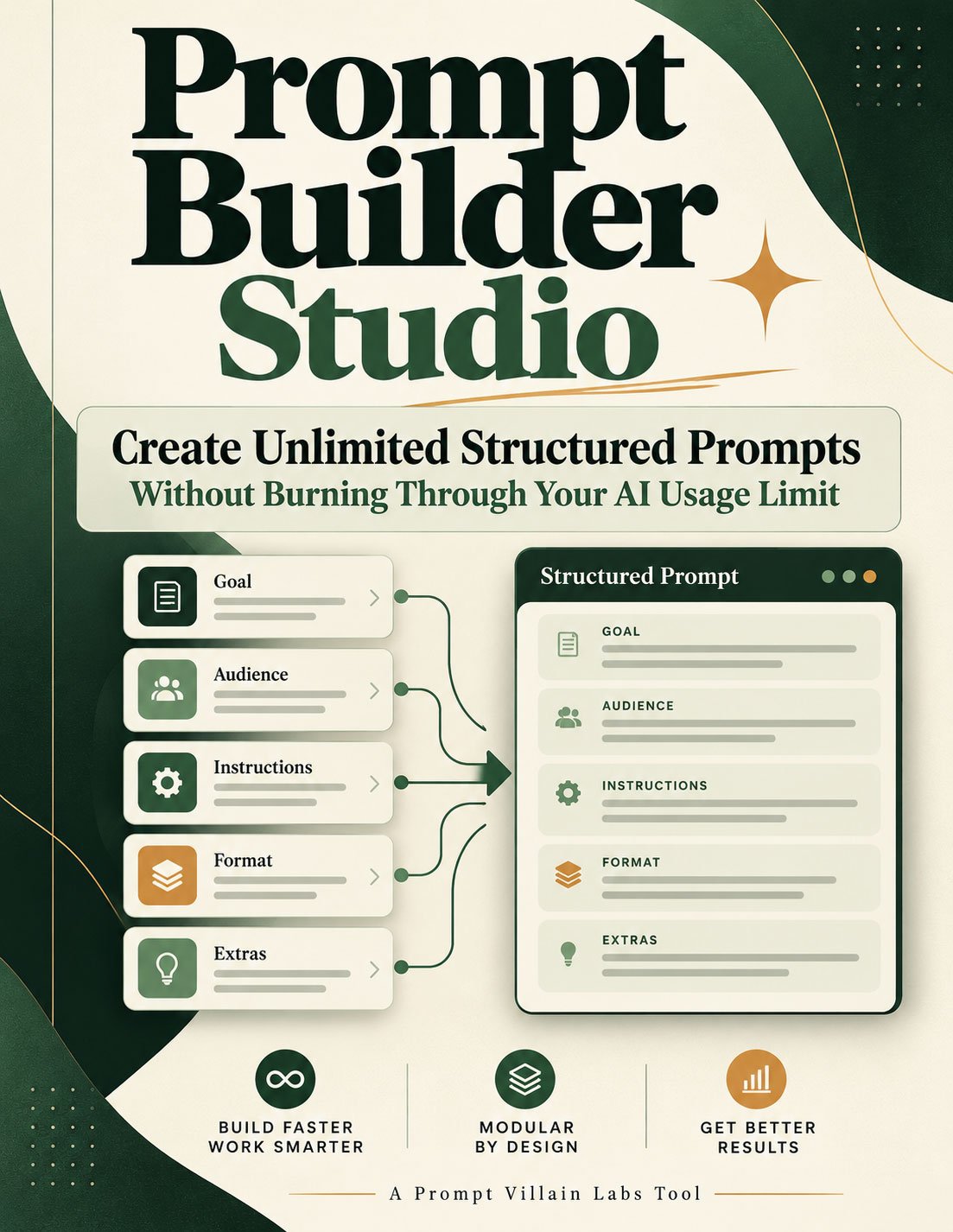
Prompt Builder Studio takes you through a guided process that helps you define your task, select the output you need, and include the requirements that matter.
Then it assembles your answers into a structured prompt, complete with task-relevant instructions.
You don't need to become a prompt engineer.
You don't need to remember complicated prompting formulas.
And you don't need to ask an AI to write your prompt for you.
You simply describe the job. The Studio organizes the instructions.
The best part?
All of this prompt preparation happens locally in your browser.
You can build a prompt, revise your answers, generate another version, and keep experimenting without making a single AI call.
Your AI allowance comes into play when you're ready to put that prompt to work.
Stop Spending AI Conversations on Avoidable Setup
There's a difference between using AI to complete a project and using AI to figure out how to ask for that project.
Prompt Builder Studio helps you separate the two.
Build without AI usage. Prepare and regenerate unlimited structured prompts locally, with no API calls during construction.
Catch missing requirements earlier. Define your audience, output format, preferences, and important restrictions before generation begins.
Skip unnecessary prompt-writing sessions. Let the Studio assemble the starting instructions instead of asking your AI to create them.
Get more specific results to review. Your requirements become part of the prompt, giving you a clearer standard for evaluating the output.
Reuse what works. Copy and save successful prompts, then adapt them for similar projects.
The result is a more organized way to work with AI—and an opportunity to reduce avoidable clarification and revision.
Actual AI usage savings vary by task, prompt length, and AI service. The Studio doesn't eliminate the need to test and review AI-generated work.
From Rough Idea to Structured Prompt in Three Steps
STEP 1 — Describe What You Want
Start with a simple sentence.
Maybe you want to create a sales letter, research a business opportunity, write an ebook, analyze a spreadsheet, or build an HTML application.
Select the closest task category and identify your intended audience if relevant.
You don't need a perfectly written description. That's the point.
STEP 2 — Add Your Requirements
Choose the type of output you want.
Tell the Studio what you already know and what your AI should account for.
Depending on your task, you can specify:
- The audience and intended purpose
- The required output format
- Tone, length, and language preferences
- Necessary sections, features, or deliverables
- Existing source material the AI needs to request
- Research preferences and important restrictions
- Anything the AI must include or avoid
You can leave many optional details undecided. Your generated instructions will guide your AI on how to handle missing information.
STEP 3 — Generate, Copy, and Use
Click Create My Prompt.
Prompt Builder Studio assembles your instructions and displays the completed prompt.
Review the included requirements, copy the result, and paste it into ChatGPT, Claude, Grok, Gemini, or another text-based AI assistant.
Need to change something?
Edit your answers and generate another version locally.
Build first. Refine freely. Use AI when you're ready.
One Tool. Hundreds of Potential Uses.
You don't need a different prompt-building system for every kind of project.
Prompt Builder Studio includes eight task categories, plus an Other option for requests that don't fit a predefined category.
Writing & Publishing
Build structured requests for ebooks, articles, guides, reports, workbooks, checklists, sales letters, and other written materials.
Marketing & Sales
Prepare prompts for promotional campaigns, advertising copy, product descriptions, landing pages, and sales materials.
Research & Comparisons
Define your research questions, comparison criteria, preferred evidence, and the information needed to support a decision.
Planning & Decision-Making
Turn your goals, available resources, deadlines, and constraints into instructions for actionable plans.
Teaching & Learning
Set the intended learner, learning objectives, and desired format for lessons, exercises, and educational materials.
Coding & Browser Tools
Describe the application or tool you want built, identify your requirements, and let your AI recommend suitable technical approaches.
Data & Spreadsheets
Prepare instructions for calculations, data analysis, spreadsheet structures, formulas, and reporting.
Images & Design
Organize creative direction, visual requirements, composition preferences, and restrictions for design-related AI tasks.
Different jobs. Different instructions. One place to prepare them.
Here's a Practical Example
Imagine you want AI to turn an existing digital product launch report into a beginner-friendly ebook.
You could open your AI assistant and type:
"Turn my report into an ebook."
But that leaves important decisions unresolved.
Who is the reader? How much detail should it contain? Should the AI preserve the original figures? What should happen if the report hasn't been supplied yet?
With Prompt Builder Studio, you can specify those details before entering the AI conversation.
Choose Writing & Editing.
Select Ebook as the output.
Identify the beginner audience.
Explain which facts must be preserved.
Tell the prompt to request your source material before writing.
Add your preferred tone, structure, and any restrictions.
Now you're bringing a more complete assignment into the AI session instead of expecting the AI to discover your requirements through a series of exchanges.
The goal isn't to make every prompt longer. It's to make the instructions relevant, complete, and useful.
More Than a Simple Prompt Template
A static prompt template gives you the same basic structure every time.
Prompt Builder Studio adapts its assembled instructions to your selected task, output, and preferences.
It also provides practical tools for reviewing and improving what you create.
Built-in inclusion checks help confirm that your supplied answers and selected instructions appear in the assembled prompt.
Materials-handling options let you direct your AI to request essential files or information before proceeding.
Copy controls make it straightforward to transfer the finished prompt into your preferred AI assistant.
A prepared testing request helps you review an AI response, identify missed requirements, and ask for a complete revised prompt.
The built-in checks review the assembled instructions—not the factual accuracy or eventual quality of your AI's answer. You remain in control of reviewing the finished work.
No Subscription to the Studio. No API Key. No Internet Needed for Prompt Preparation.
Prompt Builder Studio is delivered as a standalone HTML browser tool.
Open the file in a compatible browser and start building.
There's no separate prompt-builder account to create.
No API service to configure.
No additional prompt-generation subscription required.
And no need to connect the tool to an AI model.
The Studio works locally when you're preparing prompts.
When you're ready to execute one, copy the finished instructions into the AI service you already use.
Your AI does the work. Prompt Builder Studio helps prepare the assignment.
What You Get
Your purchase includes:
1. Prompt Builder Studio — Standalone HTML Tool
The browser-based prompt builder with guided task intake, output selection, optional requirements, local prompt assembly, and copy controls.
2. Eight Task Categories Plus Other
Flexible starting points for writing, marketing, research, planning, education, coding, data, and visual design projects.
3. Built-In Prompt Inclusion Checks
Review which selected requirements and instructions were included in the assembled prompt.
4. Prompt Testing and Improvement Assistance
A prepared testing request for evaluating AI-generated results and asking your AI for targeted improvements.
5. Prompt Builder Studio Guide
A practical guide covering setup, the prompt-building workflow, handling source materials, worked examples, testing, and improving prompts.
Everything is designed to help you move from an idea to a usable AI request with less guesswork.
Frequently Asked Questions
Does Prompt Builder Studio use my AI credits or messages?
Not while building prompts. The Studio assembles your instructions locally without contacting an AI model. Using the finished prompt in your AI assistant is subject to that service's normal limits.
Can I really create unlimited prompts?
Yes. You can assemble and regenerate prompts as often as you like within the browser tool, without a prompt-generation quota imposed by the Studio.
Does it work with ChatGPT, Claude, Gemini, and Grok?
Yes. Copy your completed prompt into any compatible AI assistant that accepts text instructions.
Do I need to know prompt engineering?
No. The guided workflow is designed to help you prepare structured instructions by answering straightforward questions.
Will it reduce my AI usage?
It moves the prompt-building process outside your AI conversation. Clearer starting instructions may also reduce unnecessary follow-up exchanges.
Actual usage depends on your task, AI platform, prompt length, and revisions.
Does the Studio generate ebooks, graphics, or code itself?
No. It generates the instructions for your AI assistant. Your chosen AI service performs the requested task after you submit the prompt.
Can I save and reuse my prompts?
Yes. Copy and save your finished prompts in your preferred storage system. The Studio does not automatically maintain a permanent prompt library, so save anything you want to keep.
Does it work offline?
Yes, for preparing and assembling prompts. You'll need access to your chosen AI assistant when you want to execute the completed instructions.
What usage rights are included?
Your purchase includes personal-use rights.
Stop Wasting Your Best AI Exchanges on Fixing Your Starting Instructions
Your ideas deserve more than a vague request followed by a string of corrections.
Whether you're developing products, writing content, researching opportunities, or building tools, it helps to enter your AI conversation knowing what you want it to accomplish.
Prompt Builder Studio gives you a dedicated place to work that out first.
Prepare your instructions.
Choose the deliverable.
Add the important details.
Build and revise your prompts without making AI calls.
Then bring your finished instructions into the AI assistant you're already using.
Create Unlimited Structured Prompts Without Burning Through Your AI Usage Limit.
Get Prompt Builder Studio Today
Build the prompt in your browser. Put your AI to work on the actual project.